GPS Speedometer - Odometer App
Tech 4 All AppsMaps & Navigation
4.03.62K Reviews
- Version
- 2.9.1
- Installs
- 10.00M
- Age Rating
- Everyone
Screenshots
Our Review of GPS Speedometer - Odometer App
 Analysis by Appyee
Have you ever found yourself curious about your speed but don’t have a speedometer handy? Well, let me tell you about this nifty little app called the GPS Speedometer - Odometer App. It’s a total game changer, especially if you’re into biking, running, or even driving an older vehicle without a functioning speedometer. After using it for a while, I’ve got some thoughts I’m eager to share!
My overall take is that this is best treated as a simple GPS-based companion, not a replacement for equipment you rely on for safety or official measurements. Its appeal is easy to understand: it puts speed and travel distance in one place, without asking you to learn a complicated navigation system. That straightforward focus is useful, but it also means the app is not the answer to every road or fitness-tracking need.
Where a separate speed readout is genuinely useful
I find the most convincing use case is a trip where the vehicle’s own speed display is missing, hard to read, or simply unavailable. A cyclist can also glance at a phone mounted securely on the handlebars to check pace on a familiar route, while a runner may use the reading as a rough point of interest rather than a complete training record. For either activity, I would set the phone up before moving and avoid handling it while underway.
Here’s a practical example: before setting off on a weekend ride, I’d open the app while stationary, wait until the GPS reading settles, choose the units I actually use, and then leave the phone in a stable mount. At the end, the distance reading can help me compare the outing with another ride, but I wouldn’t treat a small difference between trips as proof that one route was longer. GPS reception and the route itself can affect the result.
What its focused approach does—and does not—replace
Compared with a full navigation app, a speedometer tool has a narrower job. Navigation is the better choice when I need turn-by-turn directions, route planning, or help finding a destination. A dedicated fitness tracker is usually a better fit when I want a structured training history or a broader picture of exercise. This app makes more sense when the immediate question is simply how fast I’m moving and how far I’ve gone.
That distinction matters because a speed number can look precise even when conditions are not ideal. A GPS reading may lag or fluctuate when the phone has a weak view of the sky, particularly around tall buildings, dense tree cover, tunnels, or other obstructions. I would use it for a general sense of speed, not to settle a disagreement about a precise measurement or to make decisions that require certified accuracy.
It is also worth thinking about where the phone will sit. A screen that is easy to read at a glance is useful only if the device is mounted securely and positioned without blocking the driver’s view. I would not hold or adjust a phone while driving. For a car with a working speedometer, the built-in display remains the sensible reference; this app is more of a backup or a second look than a reason to ignore the vehicle’s instruments.
Getting to Know the App
First off, downloading the GPS Speedometer - Odometer App is a breeze. Whether you’re on Android or iOS, it’s available in both app stores, and it’s free! Once installed, the setup is pretty straightforward. You just need to give it permission to access your GPS, and boom, you’re ready to roll.
In the Maps & Navigation category, it comes from Tech 4 All Apps and has a 4.0 average from around 202,000 ratings. More than 10 million installs suggest that it has found a broad audience, though popularity alone doesn’t tell me whether its readings will suit a particular phone or route. It is free to install, rated for Everyone, and includes optional in-app purchases ranging from $1.99 to $49.99 per item, so I’d check the purchase details before paying for anything.
The app was released on January 2, 2020, and its current version is 2.8.1, with Android 6.0 as the minimum operating system. Those details make it worth checking compatibility on an older device before planning to use it as a trip companion. I’d also try it at home or on a short familiar outing first, rather than discovering how it behaves when I need it on a long journey.
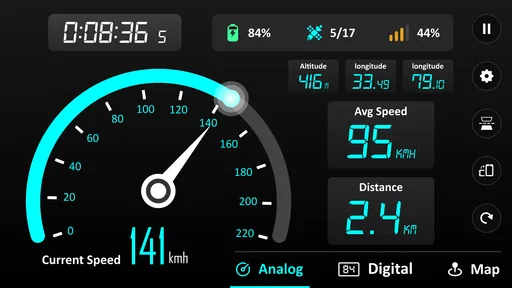
One of the first things I noticed was the app’s clean and intuitive interface. The main screen displays your speed prominently, so there’s no squinting or confusion involved. It’s just right there, in your face, doing exactly what it promises. For someone like me who appreciates simplicity, this was a huge plus.
That uncomplicated display is a strength when I only need a quick reading, but it should not be mistaken for a complete trip-planning or training dashboard. Before heading out, I’d take a moment to confirm that the chosen unit is the one I expect and that the phone is receiving GPS. That small check can prevent confusion later, especially if I have recently changed devices or traveled somewhere that uses a different distance convention.
Features Worth Mentioning
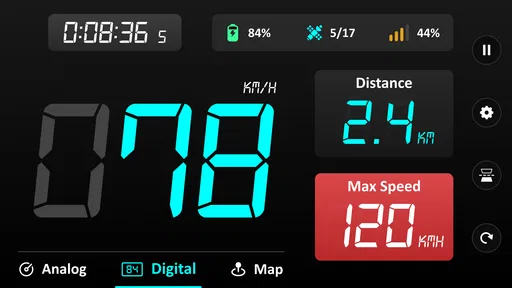
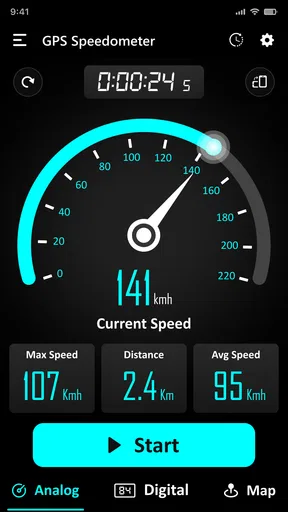
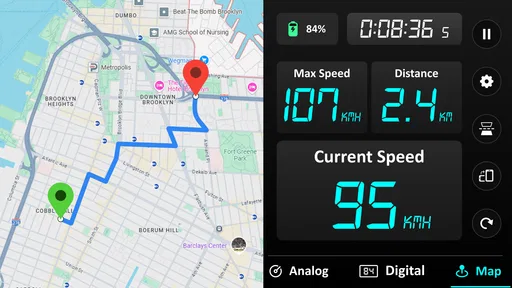
Let’s dive into some of the features that I found particularly useful. The app doesn’t just show your current speed; it also tracks your maximum speed and average speed over a journey. If you’re curious about how fast you managed to pedal down that hill or sprint during your run, this feature is golden.
Those extra figures are most helpful when I use them as context for a single outing, not as a score to chase. A brief peak on a downhill stretch can make a maximum look dramatic, while an average can be influenced by stops and slow sections. If I’m comparing rides, I’d try to follow a similar route and keep the phone in a similar position; otherwise, changes in the reading may reflect conditions rather than a genuine change in effort.
Another neat feature is the odometer. It keeps track of the total distance you’ve traveled, which is perfect for long road trips or bike rides. There’s something oddly satisfying about seeing those miles rack up over time. Plus, it’s an excellent way to keep track of your fitness progress if you’re running or cycling regularly.
For practical distance tracking, I’d use the odometer as a helpful estimate and make a note of the result at the end of a route if I want to compare outings later. It can be useful for a casual ride or drive, but anyone who needs carefully maintained training records may prefer a fitness service designed around saved activities. The trade-off is simple: this app keeps the task focused, while a more specialized tracker may offer a deeper record.
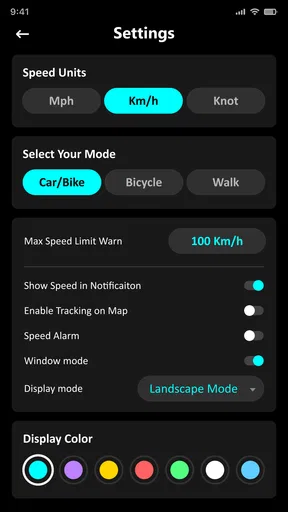
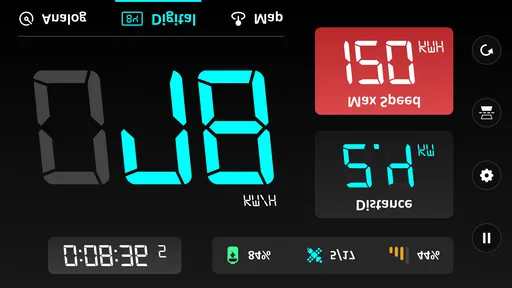
For those moments when you need to switch things up, the app offers both digital and analog speedometer displays. Whether you’re feeling a bit retro or prefer the clarity of digital, there’s an option for you. I personally like switching between the two just for fun.
The display choice is more than decoration if it affects how quickly I can read the screen. I’d choose the style that is clearest in the lighting and mounting position I actually use, then leave it alone during a trip. A visually appealing display is a nice extra, but minimizing fiddling matters more than changing its look once I’m moving.
Performance and Accuracy
Now, let’s talk about accuracy. I was pleasantly surprised by how reliable the app was. Using GPS, it provides pretty accurate speed readings. I tested it against my car’s speedometer, and the readings were consistently close. Of course, as with any GPS-based tool, it requires a good signal to function optimally, so keep that in mind if you’re traveling through a tunnel or heavily wooded area.
For the most useful comparison, I’d test it on a clear, open stretch at a steady speed, rather than judging it during acceleration, a sharp turn, or a stop. GPS-derived speed and a vehicle display may not update in exactly the same way, so a momentary mismatch is not necessarily a sign that either one has failed. I would not use the app to decide whether I can safely exceed a limit or to challenge an official measurement.
Battery consumption is always a concern with GPS apps, but I found this app to be relatively efficient. Obviously, using GPS will drain your battery faster than normal, but the app seems to have been optimized to minimize unnecessary battery usage.
Even with that experience, I’d plan for the ordinary cost of keeping GPS active during a longer outing. Starting with a well-charged phone and limiting other battery-heavy activity can make the setup less stressful. If a trip is long and the phone is also needed for navigation or communication, I would prioritize those essential tasks instead of assuming one device can comfortably do everything for hours.
Customization and Settings
If you love tweaking settings, this app won’t disappoint. There are several customization options available. You can change the units from miles per hour to kilometers per hour, which is handy if you’re traveling internationally. The color schemes are also adjustable, allowing you to personalize the look to match your style.
The unit setting deserves a quick check before every unfamiliar trip. If I’m used to miles per hour but the app is showing kilometers per hour, the display may still look plausible at a glance while telling a very different story. I’d set the units while parked and verify them once, rather than trying to work it out on the move.
Additionally, the app has a heads-up display (HUD) mode, which projects the speed onto your car’s windshield. While not something I use daily, it’s a cool feature when driving at night. It makes you feel like you’re in a sci-fi movie!
I’d treat HUD as an occasional convenience, not a reason to place the phone wherever the reflection looks best. The projection needs to remain readable without distracting me, and it should never interfere with visibility. If it is difficult to see or pulls my attention away from the road, the ordinary display—or the car’s own instruments—is the better choice.
Who I’d Recommend It To
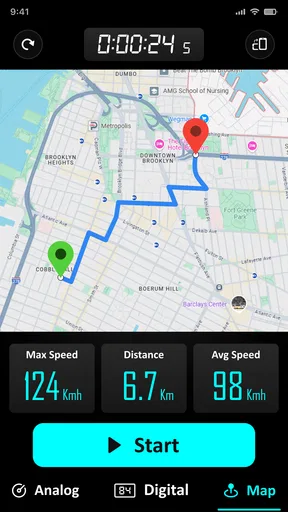
I’d recommend this app to someone who wants a straightforward speed and distance readout for casual cycling, a short run, or a vehicle whose speed display is unavailable. It also suits people who enjoy checking a route’s approximate distance without needing a full mapping interface. The simple screen and choice of display styles make it approachable for someone who does not want to spend time learning a complex tool.
I’d skip it as a primary option if I needed dependable turn-by-turn directions, extensive exercise logs, or a measurement precise enough for formal use. It is also not a good reason to interact with a phone while driving. If the phone is old, the GPS reception is poor where I travel, or I need an uninterrupted record for training, a purpose-built device or app may be a better match.
Final Thoughts
In conclusion, the GPS Speedometer - Odometer App is a solid choice for anyone needing a reliable speedometer and odometer on the go. It’s user-friendly, packed with useful features, and the kind of tool you didn’t know you needed until you tried it. Whether you’re hitting the road, the trails, or just curious about your speed during your morning jog, this app has got you covered.
So, if you’re looking for a handy, no-nonsense speedometer app, give it a try. You might just find it becomes one of your favorite go-to apps!
My recommendation comes with one clear condition: use it for awareness and casual tracking, not as a substitute for a vehicle’s working instruments, safe driving habits, or a dedicated training system. For that narrower job, I like its directness. I’d install it, check the GPS and units on a familiar route, and keep it only if its readings and screen work well with my own phone and routine.
Verdict
Strengths of GPS Speedometer - Odometer App
- Accurate speed tracking in real-time.
- User-friendly interface with easy navigation.
- Supports both metric and imperial units.
- Works offline without internet connection.
- Customizable display options.
Limitations of GPS Speedometer - Odometer App
- Contains ads that can be intrusive.
- Battery consumption is relatively high.
- Limited features in the free version.
- Some features require in-app purchases.
- Occasional GPS signal issues.
Other Releases by Tech 4 All Apps
View All
GPS Navigation: Road Map Route
Maps & Navigation4.3
Similar Picks in This Category
View All
Uber - Request a ride
Uber Technologies, Inc.4.7


inDrive. Rides with fair fares
® SUOL INNOVATIONS LTD4.8

Yandex Go: Taxi Food Delivery
Mikromobilnost LLC Belgrade4.8

Bolt: Request a Ride
Bolt Technology4.8

Rapido: Bike-Taxi, Auto & Cabs
Rapido Bike Taxi4.8
Frequently Asked Questions
What features does the GPS Speedometer - Odometer app offer?
The GPS Speedometer - Odometer app provides real-time speed tracking, distance measurement, and trip logging. It offers customizable units for speed (mph, km/h, knots) and has a HUD mode for easy viewing. Users can also track average speed, maximum speed, and set speed limits to receive alerts.
Is the GPS Speedometer - Odometer app accurate?
The app uses GPS technology to provide accurate speed and distance readings. However, accuracy can be affected by factors such as signal strength, location, and weather conditions. Users report high reliability in urban and highway settings, but results may vary in dense forests or mountainous areas.
Does the app consume a lot of battery power?
While the app is designed to be efficient, using GPS continuously can drain your battery faster than usual. It’s advisable to use a charger during long trips or keep track of battery levels to ensure the app doesn’t cause your device to shut down unexpectedly.
Can I use the app offline?
The GPS Speedometer - Odometer app requires an active GPS signal, which doesn’t rely on data or Wi-Fi. However, for full functionality and map features, an internet connection is recommended. Offline capabilities may be limited to basic speed and distance tracking.
Is the app compatible with all devices?
The app is compatible with most Android and iOS devices. It requires a minimum operating system version, usually Android 5.0+ or iOS 10.0+. It’s wise to check the specific requirements on the app store to ensure compatibility with your device before downloading.
